Compliance training LMS: deadlines, proof and renewal
A compliance training year on an LMS, from assigning the course to renewal twelve months later, with the records you can export when an auditor asks and the settings that quietly lose them.

On this page
A compliance training LMS does two jobs: it chases people until the training is done, and it keeps a record that it was done. It doesn't make your organisation compliant with any law or standard. That depends on what the training covers and what your regulator, client or auditor requires, which is a question for your compliance lead or lawyer. What software can do is take the reminding, the counting and the filing off your desk.
Here's one compliance year on Cloudgramam LMS, month by month, using an illustrative annual course on data protection for a 400-person company. Every feature named is in the product's documentation. Where a setting can quietly lose evidence, the timeline says so.
Cloudgramam sells this LMS, so this walk-through shows our product. It's self-hosted, so the server and its records belong to you, and the licence is per domain, not per learner.
What does a compliance year look like on an LMS?
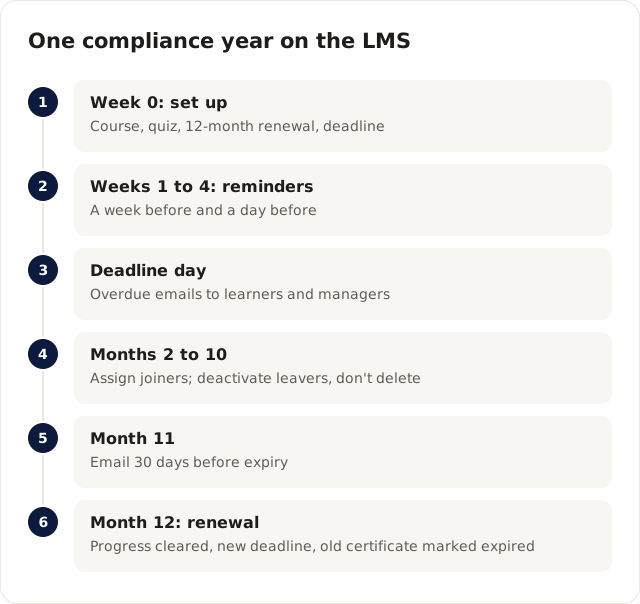
It runs in six stages, and most of the work is in the first week and the last month. The table is the summary; the sections after it explain each stage.
| When | What happens | Who does it |
|---|---|---|
| Week 0 | Build the course and quiz, set "Recertify every 12 months", assign with a finish-by date | Administrator |
| Weeks 1 to 4 | Learners complete; reminders a week before and a day before the deadline | The LMS, daily |
| Deadline day | Overdue emails to learners; managers told who on their team is late | The LMS |
| Months 2 to 10 | New joiners assigned; leavers switched off; certificates checked by outsiders | Identity provider, managers |
| Month 11 | Learners emailed 30 days before their certificate expires | The LMS |
| Month 12 | Progress cleared, new finish-by date set, retraining starts; old certificate marked expired | The LMS |
What gets set up in week 0?
The course, its pass mark, its renewal period and the first deadline. Get these right and the rest of the year mostly runs itself.
Build the course from lessons and finish with a quiz. Pass marks are enforced on the server. For compliance, I'd use a question bank (draw, say, 15 of 40 questions per attempt), shuffle the answers and set an attempt limit. Shuffling matters more than people expect: without it, an answer key can travel round the office on the first afternoon. A certificate is issued only once every lesson and assessment is complete.
Then open the course editor's certificate validity setting and choose "Recertify every 12 months". Assign the course with a finish-by date, either to a whole team or to one person as you grant access. If your staff and your server sit in different time zones, set the deadline time zone now, so a deadline day ends where your people work.
If you already have a SCORM course from an authoring tool, you can upload it as a lesson. The LMS is built against the SCORM specifications but isn't ADL certified, so test your tool's export first; our SCORM, xAPI and cmi5 guide covers what to check.
How are people reminded before the deadline?
By email, a week before and the day before. Each notice is sent once per date, by a daily job that runs from cron or the built-in timer. If that job isn't scheduled, nothing goes out, so check it in week 0, not in week 3.
Learners also see the deadline on their dashboard and course page, and the course with the nearest deadline is the one the dashboard offers to resume first. For people who don't read email, WhatsApp reminders can go to learners who verified their number and opted in, through Meta's WhatsApp Business Cloud API. That was tested against a simulated Meta API, so send a real test message from the admin area before you rely on it.
What happens on deadline day?
Learners who haven't finished get an overdue email, and their team manager is emailed too, once per person per deadline. The manager's team view shows everyone as overdue, due soon or done, and exports to CSV.
That export is the first document an auditor usually wants: a list of who was required to do the training, the date it was due, and who completed it. Save a copy at the deadline. The live view keeps changing as late people finish, and a snapshot at the deadline shows where you stood that day.
What happens in the middle of the year?
People join and leave, and both need handling without breaking the records. This is the stage where evidence most often goes missing.
New joiners can be enrolled automatically if your identity provider uses SCIM groups linked to the course, or added by a manager. Leavers are where care is needed. Deactivating an account, by SCIM or by hand, ends their access and keeps their progress and certificates. Deleting an account is different: it removes their credentials. If you might need to prove a former employee was trained, deactivate, don't delete.
There's a second trap in the same place. The data retention job removes deactivated accounts after the number of days you set. Set that period to match how long you need to keep training records, which your compliance lead should decide, and preview it with the dry run before it runs for real.
Meanwhile, certificates do their own work. Each carries a random credential ID and a QR code that opens a public /verify page showing who earned which course and when, with a "Valid until" date. A client or regulator can check a certificate without emailing you. IDs can't be guessed from user or course numbers, and lookups are rate limited.
What happens at month 11 and month 12?
At month 11, learners are emailed 30 days before their certificate expires. At month 12, their progress and quiz attempts for that course are cleared and a new finish-by date is set, 30 days out by default. They retake the course, and finishing it issues a new credential.
The old certificate isn't deleted. It stays on the public /verify page marked expired, so the record of last year's training survives. Learners who no longer have access to the course are left alone, which is right for leavers. The new deadline triggers the same reminders and overdue alerts as week 0, so the second year starts without anyone assigning anything.
What will an auditor ask to see?
It depends on the auditor and the rule you're being audited against, so ask them early. In general, expect requests for who had to complete the training, who did and when, what the training contained, and how you followed up on people who were late. From the LMS you can produce:
- The team deadline export, showing overdue, due soon and done per person.
- The course completion report, as CSV, including where learners stopped.
- Certificates, each checkable on the /verify page with its issue and expiry dates.
- Quiz scores from the learner's attempts.
- The course content, to show what the training covered.
- The admin area's recent administrative actions, for who changed what.
Two gaps to know about. For instructor-led sessions held over Zoom, Meet or Teams, the LMS records who opened the join link, not who stayed, so keep the meeting tool's attendance report as well. And each year's recertification clears the previous attempts for that course, so export last year's reports before month 12 if you need the detail, not only the expired certificate.
Frequently asked questions
Does using an LMS make us compliant?
No. An LMS records and reminds. Whether your training meets a law, standard or contract depends on its content and on what the requirement says, so confirm that with your compliance lead or lawyer.
Can we use a different renewal period for different courses?
Yes. "Recertify every N months" is set per course, so a yearly course and a two-year course can run side by side.
Where do the records live?
On your own server, because Cloudgramam LMS is self-hosted. That keeps them in your control, and it also makes backups your job; the self-hosted LMS guide covers what that involves.
You can see a learner's dashboard, deadlines and a certificate on the Cloudgramam LMS demo. For the team-manager side, read what a corporate training LMS needs, and for licence costs at your headcount, the LMS pricing guide. To set up a compliance course on your own install, talk to us about Cloudgramam LMS.