Protecting course videos in an LMS: what really works
No LMS can stop a learner recording their screen. What you can control is how easy the file is to copy, who can play it, and whether a leaked copy points back to someone. Here is how each measure works and what it stops.
On this page
- How does a course video get to a learner's screen?
- What does AES-128 encryption in HLS actually do?
- Why do access checks matter more than the encryption?
- What does a watermark add?
- What does each measure stop, and what gets past it?
- Can anything stop screen recording?
- What is DRM, and why isn't it in Cloudgramam LMS?
- What should you check before relying on any of this?
- Frequently asked questions
No setting in any LMS stops a determined learner from recording their screen or pointing a phone at it. What you can control is how hard the video file is to copy, who can play it at all, and whether a leaked recording points back to the account that made it. Those three things stop most casual sharing, and that's the realistic goal.
This explainer starts from how a video actually travels to a learner's screen, because every protection works at one step of that trip. It's for course sellers and training teams deciding what to pay for. If your contract with a film studio demands studio-grade DRM, skip to the DRM section; the rest won't be enough for you.
How does a course video get to a learner's screen?
Either as one file the browser downloads, or as a stream of small encrypted pieces. Which one your LMS uses decides how easy copying is.
The simple way is a file link: the lesson page points the browser at video.mp4 on a server. It plays fine. But the address is the file, so anyone who opens the browser's developer tools, or right-clicks in some players, can copy the address and download it. If that address works without signing in, it can be shared in a group chat and played by anyone.
The other way is HTTP Live Streaming, or HLS. Apple's HLS page describes it as using ordinary web servers and content networks, and adapting playback to the speed of the connection. The video is cut into short segments, and a playlist file (.m3u8) tells the player which segments to fetch and in which quality. The protocol itself is written up in RFC 8216. Both were checked on 16 November 2026.
What does AES-128 encryption in HLS actually do?
It scrambles every segment, so a copied segment is useless without the key. The protection is only as good as the gate in front of the key.
RFC 8216 defines METHOD=AES-128 as segments fully encrypted with a 128-bit key in CBC mode with PKCS7 padding. The playlist's EXT-X-KEY line carries a URI that says how to get the key. The RFC's security section says key delivery should be secured with HTTP over TLS, together with a protected sign-in area or a session token. Put simply: if the key address answers anyone who asks, the encryption barely matters. If it only answers a signed-in learner who's allowed to watch that lesson, a scraped playlist gets you scrambled data.
There's a limit built into this. The learner's browser has to decrypt the video to show it, so the key and the decoded picture are on the learner's device while they watch. Encryption protects the file in transit and at rest. It doesn't protect the picture on the screen.
Why do access checks matter more than the encryption?
Because the access check decides who gets the key and the segments in the first place. Strong encryption with a lax access check is a locked door with the key taped to it.
Here's how we built it in Cloudgramam LMS. Each lesson video is converted by ffmpeg into several HLS qualities, from 1080p down to 360p and never above the source, encrypted with AES-128, and served only to people allowed to watch that lesson. There's no file address to share. A learner who sends the lesson link to a friend sends a page that asks the friend to sign in, and their account has no access to the course.
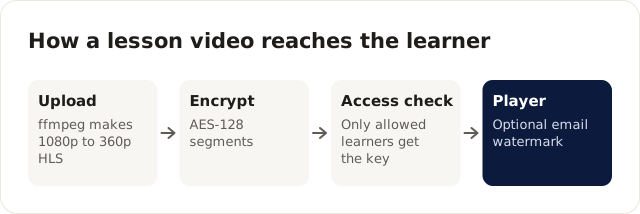
Every stage protects the file or the stream; none of them protects the picture on the screen.
What does a watermark add?
A watermark doesn't block copying. It makes a copy traceable, which changes whether people bother.
With VIDEO_WATERMARK=true, the learner's email drifts across the video at low opacity. The video's own full-screen button is replaced by one that keeps the label on screen, so full screen doesn't drop it. Someone who records the screen records their own email with it. That discourages sharing among people who'd rather not be identified. It doesn't stop someone who's willing to blur or crop the recording.
What does each measure stop, and what gets past it?
Each layer stops one kind of copying and leaves another. This is the honest summary.
| Measure | What it stops | What gets past it |
|---|---|---|
| No public file address | Copying a link and sharing it with people who aren't enrolled | Anything done by an enrolled learner while signed in |
| HLS segments | Right-click saving of one complete file | Download tools that read the playlist and fetch the segments |
| AES-128 with the key behind sign-in | Those tools, unless they also hold a signed-in session with access | A tool run inside a learner's own session |
| Per-lesson access checks | Non-enrolled accounts and expired access getting the stream | Account sharing, where two people use one login |
| Visible watermark | Casual sharing of recordings by people who don't want to be named | Cropping, blurring or a recorder who doesn't care |
| DRM (not included in our LMS) | Depends on the DRM system and device; read the vendor's own documentation | A camera pointed at the screen |
Can anything stop screen recording?
No. Every protection ends at the screen, because the learner has to see the picture. A phone camera aimed at a laptop records whatever's shown, DRM or not.
That's why I'd spend effort on making the copy less worth having rather than on chasing a block that doesn't exist. Course content that ties into quizzes, assignments marked by a person, certificates with QR verification and live classes is worth more inside the platform than a pirated video folder is outside it.
What is DRM, and why isn't it in Cloudgramam LMS?
DRM is a licensed system for encrypting content, exchanging keys and controlling playback on approved devices. The two you'll meet are Google's Widevine and Apple's FairPlay Streaming, and both come with licensing and server requirements of their own.
Google's Widevine page calls it Google's content protection system for premium media and says the documentation depends on licensing Widevine. Apple's FairPlay Streaming page says FPS protects HLS playback on Apple platforms, that implementers build a Key Server Module, and that production credentials need Apple's approval. Apple says it approves requests only from teams that provide a streaming service to consumers, and not from third parties acting for content owners. Both pages were checked on 16 November 2026.
We didn't build DRM in because it needs a commercial licence server and packaging service that this product doesn't include. If you need it, you'd add a video provider that offers it, and that's a separate contract and cost.
What should you check before relying on any of this?
Check what happens while a video is still converting. In our LMS, learners watch the original uploaded file until the encrypted stream is ready, or if conversion fails. Conversion runs on your own server, one video at a time, so a long video can take a while. Upload a day before you publish, and check the lesson shows the stream before you announce it. The server needs ffmpeg, which the installer adds.
Captions travel with the lesson, too. You can add WebVTT caption files per lesson, in any number of languages; WebVTT is the W3C's Web Video Text Tracks format. If you teach in more than one language, see multilingual LMS checks.
Frequently asked questions
Is the watermark on by default?
No. It's switched on with the VIDEO_WATERMARK=true setting on the server, and then it shows on lesson videos.
Do learners on slow connections still get a watchable video?
That's what the several HLS qualities are for. Apple describes HLS as adapting playback to the available connection speed, and our conversion makes versions from 1080p down to 360p.
Does a leaked recording tell me who shared it?
If the watermark was on and the recording wasn't cropped, the learner's email is in the picture. That's evidence to act on under your own terms of use, not proof of who uploaded it somewhere.
Cloudgramam sells this LMS, so we have an interest in how you protect your videos. Everything above about the product comes from its own feature list, and the standards facts come from the RFC, Apple, Google and W3C pages linked above, checked on 16 November 2026. To see the player, open the live demo or read the Cloudgramam LMS page. For course sellers, LMS for training companies covers selling and access; for the full self-hosting picture, start with the self-hosted LMS guide.