Meta ads creative testing on a small budget: 4-week plan
On a small budget you can't test everything. A week-by-week plan for testing Meta ad creative: what goes in, when to look, when not to touch anything, and how to pick a winner that brings customers.
On this page
Fifty. That's roughly how many optimisation events Meta wants an ad set to get in the week after its last significant edit, and most small budgets don't get there. So on a small budget, test a few big ideas in one ad set, leave them alone for a full week, judge them on qualified leads rather than cost per lead, and make your changes in one batch. Here's how I'd run that over four weeks.
This plan is for businesses spending a modest amount on Meta each month who want better ads without hiring a creative studio. If your budget is large enough to run Meta's A/B test tool properly, use that instead; there's a note on it at the end.
Why does a small budget change how you test?
A small budget can't produce enough results to leave Meta's learning phase, so every extra ad set and every edit makes the data thinner. Meta's help pages flag an ad set as "Learning limited" when it's unlikely to get around 50 optimisation events in the week after its last significant edit. Significant edits include pausing, and changing the optimisation event, audience or creative.
If your budget brings 10 leads a week, you'll rarely leave learning, and each new ad restarts the clock. Meta's suggestions for learning limited ad sets include raising the budget, widening the audience or choosing an optimisation event that happens more often. For a small account, that adds up to fewer ad sets with more budget each, broad audiences, and a goal the account can reach.
What does the four-week plan look like?
One ad set, three to five very different ads, one look at the results each week, and one batch of changes at the end.
| When | What you do | What you don't do |
|---|---|---|
| Before week 1 | Write three to five different ideas; set up lead tracking by ad | Make five versions of one idea |
| Week 1 | Launch and leave it | Pause, edit or add ads |
| Week 2 | Read cost per lead and early lead quality | Pick a winner on cost per lead alone |
| Week 3 | Compare ads on qualified leads from the CRM | Trust Meta's spend split as the verdict |
| Week 4 | Keep the winner, pause losers and add new ideas in one edit | Rebuild the whole campaign |
What do you prepare before week 1?
You need ideas that are far apart, and a way to see which ad each lead came from. Small differences, like a new headline or button colour, need big budgets to detect. A different idea can show a clear gap within a week or two on a small budget.
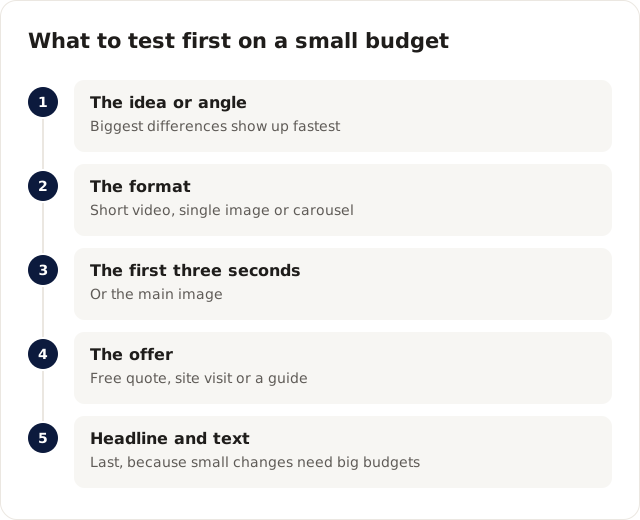
I test in this order, moving down only once the level above has a winner:
- The idea or angle: "Save on bills" against "Finished in one day" against a customer's own words.
- The format: short video against single image against carousel.
- The first three seconds of the video, or the main image: before-and-after against a person talking against the product in use.
- The offer: free quote against free site visit against a guide.
- Headline and text, last.
Good ideas rarely come from a brainstorm. I get most of mine from sales calls, where customers' questions and objections are ready-made angles, from reviews, whose wording beats marketing copy, and from the client's best organic Instagram or Facebook posts. Meta's Ad Library shows what others in your field are running; learn from it, don't copy it.
For tracking, put the ad name or a UTM tag on every lead in your CRM. Without it, week 3 is impossible.
What happens in week 1?
You launch one campaign with one ad set, a broad audience and the goal you care about, then you leave it alone for seven days. That's the hardest part for most owners.
Spend will be uneven. Meta tends to put more budget behind the ads it predicts will do well, so one ad may get most of the money by day three. That's normal, and it isn't a verdict.
What do you look at in week 2?
Look at cost per lead and at the first sign of lead quality, but don't act on either yet. Ask whoever calls the leads which ones sounded serious. Read the comments on each ad, because they tell you which message people misunderstood.
Only pause an ad this early if it's plainly broken: a wrong link, a typo in the price, or zero leads on real spend.
Why can week 3 change your mind?
By week 3 your CRM knows things Meta doesn't, and the cheapest ad is sometimes the worst one. Here's an illustrative example. A physiotherapy clinic tests three videos. Video A, a cheerful "Book your free assessment" ad, gets leads at $12. Video B, the physio explaining how they treat lower back pain, gets leads at $21. Meta moves most of the spend to A. In week 3, the front desk notices that B's leads turn up for appointments far more often, and many A leads never answer the phone.
What the clinic should do:
- Compare ads on cost per attended appointment, which the CRM can show and Meta can't.
- Send the "attended" stage back to Meta through the Conversions API, so the platform judges ads the same way.
- Give video B its own ad set with a fixed budget for two weeks if Meta keeps starving it.
What do you change in week 4?
Make all your changes in one sitting, because each significant edit restarts learning. Keep the winner on qualified leads, pause the clear losers, and add two or three new ideas next to the winner. The next cycle can then move one level down the test order, from idea to format, or from format to opening seconds.
Leave the winner running untouched. Add new ads when its results start to slip, or every few weeks, rather than replacing everything at once.
When is Meta's A/B test tool worth using?
Meta's A/B test tool splits the audience so the ads don't compete, which gives a cleaner answer than the single ad set above. It needs more budget than most small accounts have, because each side has to collect enough results on its own. Once an account spends enough for each side to get a steady flow of conversions, I switch to it for the tests that matter most.
Whichever method you use, the score that counts is the one in your CRM. Our guide to lead forms versus website forms covers a similar four-week test for where the ads should send people.
One last note: Cloudgramam runs creative tests like this as part of our Meta Ads management service, so we have an interest in the subject. Your ad spend is paid to Meta, not to us. Meta's learning phase rules were checked on Meta's help pages on 16 November 2026.