Meta Conversions API for lead generation, in plain words
The Conversions API lets you tell Meta which leads became customers, so it can find more of them. The questions business owners ask about it, answered one by one, including why it sometimes changes nothing.
On this page
- What is the Conversions API, in plain words?
- Which version do I need if I run lead ads?
- What does Meta need from my CRM?
- Is there a minimum number of leads before it helps?
- Do I need a developer to set it up?
- Which lead stages should we send?
- We connected it six weeks ago and nothing changed. What went wrong?
- Can I use the Conversion Leads goal before the CRM connection is ready?
- How will I know it's working?
For a business that sells through enquiries, the Meta Conversions API is how you tell Meta which leads turned into customers. Your CRM sends each lead's stage (new, qualified, customer) back to Meta, you choose the Conversion Leads goal on your Instant Form campaigns, and Meta starts looking for people like your buyers instead of people who like filling in forms. It only works if the CRM keeps Meta's lead ID and your team keeps lead statuses up to date.
Owners running Meta lead ads ask me about this a lot, usually after a few months of cheap leads that don't pick up the phone. Below are their questions in roughly the order they come up, with the answers I give. If you sell through a Shopify store, the set-up is different, and our Conversions API for Shopify guide covers it.
Cloudgramam manages Meta ads for clients and charges for that work, so read our answers knowing we sell the service. Your ad spend goes to Meta, not to us. The Meta documentation quoted below was read on 16 November 2026.
What is the Conversions API, in plain words?
The Conversions API is a server-to-server connection that sends events to Meta from your own systems instead of from the visitor's browser. Ad blockers can't stop it, and it can report things a browser never sees, like a lead signing a contract two weeks after filling in a form.
When I explain it to an owner, I put it this way: the pixel tells Meta what happened on your website, and the Conversions API can tell Meta what happened in your office afterwards.
Which version do I need if I run lead ads?
If your ads use Meta's Instant Forms, you need the Conversions API for CRM. If your ads send people to a website form, you need website events sent alongside the pixel. Plenty of accounts end up with both.
| Version | What it sends | Who it's for |
|---|---|---|
| Website events | Lead and other events from your website's server, alongside the Meta pixel | Businesses whose ads send people to a website form |
| Conversions API for CRM | Lead stages from your CRM: raw lead, qualified, customer | Businesses using Meta's Instant Forms (lead ads) |
What does Meta need from my CRM?
Meta needs the lead ID it gave each lead, plus an update each time that lead moves to a new stage. The details come from Meta's Conversions API for CRM documentation:
- Your CRM stores Meta's lead ID (the leadgen_id) with each lead. It's the strongest way to match; email or phone can be used if it's missing.
- You send each stage as it changes, including the raw lead. Meta asks for at least two stages and recommends three or more.
- In the ad set, you choose the Conversion Leads performance goal for your Instant Form campaigns.
- Meta estimates about three to four weeks before results improve, and suggests matching events for at least 60% of your leads.
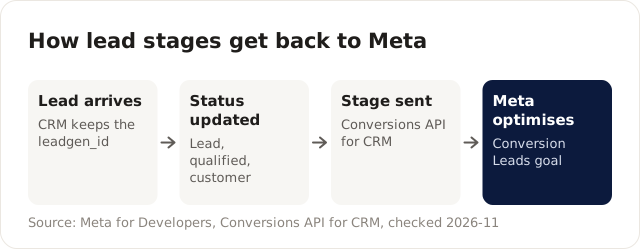
The loop only works if step 2 happens the same day; late status updates are the usual reason nothing improves.
The first thing I check in a new account is whether the leadgen_id survives the trip into the CRM. If leads arrive by someone copying rows from a downloaded file, the ID column is often the first thing that gets dropped, and then every match has to fall back on email or phone.
Is there a minimum number of leads before it helps?
Meta's own pages disagree on this, so check your account in Events Manager or ask Meta. The developer documentation lists eligibility conditions, including around 200 leads a month and a chosen stage that converts at 1% to 40% within 28 days. A newer Meta business news post says the minimum lead volume requirement has been removed.
My own position: if you get a few dozen leads a month, set up the connection anyway, because the stage data is useful in your own reports. Just don't expect Meta's delivery to change much until there's more for it to learn from.
Do I need a developer to set it up?
Often you don't. Many CRMs have a built-in Meta connection that sends a lead's stage when you change its status, and Meta lists partner integrations such as Salesforce webhooks and Zapier.
The part no tool does for you is the habit. Someone has to change the status in the CRM when a lead is called, qualified or lost. A connection with no status changes behind it sends Meta nothing new.
Which lead stages should we send?
Send the stages your team already uses, and keep them few. For most service businesses I'd start with three:
- Lead, sent automatically when the form arrives.
- Qualified: your team spoke to the person and they fit.
- Customer: they bought, booked or signed.
Optimise for a stage that happens often enough to give Meta something to learn from, which is usually the qualified stage. Write down what "qualified" means for your business, for example "budget confirmed and inside our service area", so two salespeople don't mark the same lead differently.
We connected it six weeks ago and nothing changed. What went wrong?
Usually the data, not the connection. Take an illustrative solar installer that sends lead stages to Meta through its CRM's built-in connection and sees no improvement after six weeks. In Events Manager, the qualified stage arrives in large batches once a week, because the sales team tidies the CRM on Fridays. Many leads are still marked "new" days after they were called, and coverage sits well below Meta's suggested 60%.
The integration is working. What it's sending is late and incomplete. Here's how I'd fix it:
- Agree a rule with the sales team that every lead's status is updated the same day it changes. Put it in the call script, so it isn't an end-of-week chore.
- Cut the stages down to the ones people will really update. Three used stages beat seven ignored ones.
- Check coverage weekly in Events Manager and share the number with the sales lead.
- Count Meta's three to four weeks from the day the data started flowing properly, not from the day the connection went in.
Can I use the Conversion Leads goal before the CRM connection is ready?
Meta's documentation says the goal can run without the CRM connection, but results improve once it's in place. I'd still build the connection first. Switching goals later counts as a significant edit and sends the ad set back into learning, so it's simpler to change once.
How will I know it's working?
Watch two numbers: coverage in Events Manager, and cost per qualified lead in your own CRM report. If coverage is above Meta's 60% and cost per qualified lead falls over the following month or two, it's doing its job. If cost per lead rises while cost per qualified lead falls, that's normally a good trade, and it's the reason to use this goal at all.
Our cost per lead reporting dashboard guide shows how to put those numbers on one page, and the performance marketing guide for small businesses explains why cheap leads tend to get worse without this feedback. If you'd rather have someone wire up the stages and watch the coverage for you, that's part of our Meta Ads management service.