Why your ads "don't work": a diagnostic checklist
Ads bring the visitor; the page and the follow-up turn them into a customer. A checklist to work out which part is failing, with how to run each check and what a bad result looks like.
On this page
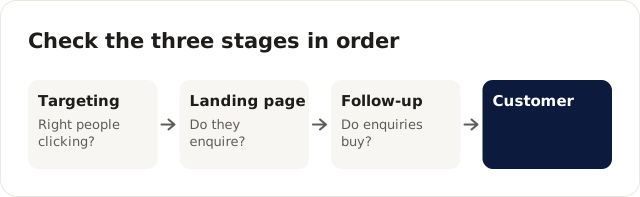
Ads that bring clicks but no customers usually have a page problem or a follow-up problem, not an ad problem. Check three places in order: the targeting (are the right people clicking?), the landing page (do they enquire?) and the follow-up (do enquiries become customers?). This is the checklist I work through when an owner tells me ads don't work for them, with how to run each check and what a bad result looks like.
It's for business owners who've tried Google or Meta ads, or paid an agency, and given up. It won't help if you haven't run ads yet; start with the performance marketing guide for small businesses instead.
Before you read on: Cloudgramam sells ad management, so a post saying "it's probably not the ads" suits us as much as one saying it is. Ad spend is paid to Google or Meta directly. Platform details were checked on their help pages on 16 November 2026.
Why check in this order?
A fault early in the chain makes everything after it meaningless. If the wrong people are clicking, a low enquiry rate tells you nothing about the page, and if the page is broken, lead quality tells you nothing about the follow-up.
| Stage | Look at | Sign of a problem |
|---|---|---|
| Targeting | Search terms (Google), audience and placements (Meta) | Clicks from irrelevant searches, places you don't serve, or people who'd never buy |
| Landing page | Conversion rate from click to enquiry | Lots of relevant clicks, few enquiries |
| Follow-up | Share of enquiries contacted, qualified and won | Plenty of enquiries, few customers |
How do you check the targeting?
Look at who actually clicked, not at who the campaign was meant to reach. Settings describe intentions; reports describe what happened.
Check 1: what people searched
How to run it: open the search terms report in Google Ads for the last 30 days and sort by cost. A bad result is money going to searches for jobs, free versions, how-to guides or a competitor's name you didn't mean to bid on. Our negative keywords guide covers the fix.
Check 2: where the clicks came from
How to run it: check the location report in Google Ads and the breakdown by region in Meta. A bad result is clicks from cities you don't serve. When I see that, I check the campaign's location options as well as its list of places.
Check 3: Meta placements and audience
How to run it: break down Meta results by placement. A bad result is a large share of spend on placements where leads never turn into calls, or an audience so narrow it never leaves learning.
Check 4: brand mixed with everything else
How to run it: see whether searches for your own business name sit in the same campaign as generic searches. A bad result is a healthy-looking average that hides generic terms losing money. The Google Ads audit checklist goes further.
How do you check the landing page?
Open the page on your own phone, as a stranger who just tapped the ad, and try to enquire. Most page problems show up in the first minute.
Check 5: does the page repeat the ad's promise?
If the ad said "Same-day AC repair", the headline should say it too. A bad result is a home page, or a headline about your company's history.
Check 6: is there one clear action?
Call, WhatsApp or a short form, plus a line saying what happens next and how fast, such as "We'll call within 15 minutes during business hours". A bad result is a full site menu, three different buttons, or a form asking for things the first call doesn't need.
Check 7: is there proof and a price near the action?
Reviews, photos of real work and credentials should sit close to the form, with a price, a range or a "from" price where you can give one. People who know the rough price and still enquire are better leads. A bad result is proof buried three screens down and no hint of cost.
Check 8: does the form work on a phone?
How to run it: submit the form and tap the call button on two different phones, then confirm the enquiry reached your inbox or CRM. This is the check I never skip, because the failure is silent. Take an illustrative dental group that switches agencies twice in a year because enquiries stay low. The third agency tests the booking form on a phone and finds the confirmation step fails on some mobile browsers: people fill it in, tap submit, see an error and leave. The ads were fine all along; around a third of mobile enquiries never arrived.
To avoid a year like that, repeat this test every month and after any website change, and set an alert in Google Ads and your analytics if conversions drop to zero for a day.
Check 9: does the page load fast on mobile data?
How to run it: check the device report in Google Ads and Meta to see what share of your clicks come from phones, then load the page on a phone over mobile data, not office Wi-Fi. A bad result is a page that's still blank after a few seconds on mobile data, usually because of a large image or video at the top.
How do you check the follow-up?
Pull last month's leads and look at what your team did with each one. This is where I find the problem most often in small businesses, and it's the cheapest to fix.
Check 10: how fast was the first reply?
How to run it: for each lead, note when it arrived and when someone first replied, then work out the median. A bad result is a median measured in hours, or leads from the evening that wait until the next afternoon. The speed to lead playbook shows how to bring it down.
Check 11: how many attempts were made?
Many leads don't answer the first call. A sequence of a call, a message, a second call and a final message over a few days gives each lead several chances. A bad result is one attempt, then "not interested" in the CRM.
Check 12: what happens at 7 pm?
How to run it: submit your own form and call your own number from the ad, as a customer would, at 7 pm on a weekday. A bad result is voicemail, no auto-reply, or a call back the next day. For chats, see click-to-WhatsApp ads.
Check 13: do the lead counts match?
How to run it: compare the leads Google and Meta report for a week with the leads your team received. A bad result is a gap in either direction, which means a tracking fault or a form fault.
What if every check passes?
Then look at the offer, the price and the market, and give the campaign enough time. Two to three months with tracking and follow-up in place is usually enough to get a meaningful number of enquiries and see what happens to them. Our cost per lead benchmarks post explains how to tell whether your numbers are reasonable for your field.
And before you change agency, run this list. It costs an afternoon, which is a lot cheaper than a new contract. If you'd rather have the ads, the page and the follow-up looked at together, that's what our performance marketing services are for.