Performance marketing for small business: measure the sale
Google and Meta learn from whatever you tell them is a conversion. Why small businesses should measure ads to the customer, what to set up first, and how to decide what to spend.
On this page
- What does "measured to the customer" mean?
- How do Google and Meta learn who to show your ads to?
- What needs to be in place before the first campaign?
- Should a small business start with Google or Meta?
- How much can you afford to pay for a lead?
- When should you raise, hold or cut the budget?
- What goes wrong in accounts that have been running for a while?
- Should you run the ads yourself or hire help?
- Frequently asked questions
Performance marketing is paid advertising judged by results you can count, and for a small business the result that counts is a customer, not a click or a form. Get that one choice right and most of the rest follows. Google and Meta learn from what you report back to them: report customers and they look for more people like your customers; report form fills and they find people who fill in forms. So fix the tracking, the landing page and the follow-up first, and only then decide how much to spend.
I've written this for owners and marketing leads at service businesses, clinics, schools, B2B firms and local companies that want enquiries from ads. It isn't about brand campaigns measured by reach, and online stores have their own problems, covered in Google Ads for Shopify.
Our interest, up front: Cloudgramam runs Google and Meta ads for clients, so we sell the work this guide describes. Your ad spend goes from you to Google or Meta directly, never through us. Platform details were checked on Google's and Meta's own help pages on 16 November 2026, and they change often, so check again before you act.
What does "measured to the customer" mean?
It means judging every ad by how many paying customers it produced and what each one cost, rather than by clicks or raw enquiries. Most accounts stop one step short of that.
A typical account counts a conversion when someone submits a form or taps a phone number. That's a start. The trouble is everything an enquiry can hide: people who never pick up the phone, students doing research, competitors checking your prices, and someone who wanted a service you don't offer. To the ad platform, all of them look the same.
So I think about tracking in three levels, each feeding the next:
| Level | What you count | How it reaches the ad platform |
|---|---|---|
| 1. Enquiry | Form submitted, call over 60 seconds, WhatsApp chat started | Website tag or the platform's own lead form |
| 2. Qualified lead | Your team confirmed the person fits: right service, right location, real budget | Imported from your CRM |
| 3. Customer | Paid, booked, enrolled or signed | Imported from your CRM, ideally with the value |
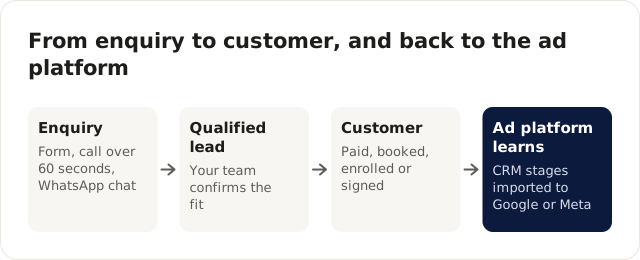
Level 1 is all a website tag can see on its own. Levels 2 and 3 only exist in your CRM, or in the sheet your team uses, because only a person who spoke to the lead knows whether they were real. Getting those two levels back to the ad platform is where small accounts gain the most, because it tells the platform which kind of enquiry is worth paying for. On Google that's offline conversion import or enhanced conversions for leads. On Meta it's the Conversions API for lead generation.
How do Google and Meta learn who to show your ads to?
They learn from the conversions you report. Automated bidding looks at who converted, finds patterns, and bids more for people who match them, so the conversion you choose is the instruction you're giving.
That's why the definition of a conversion matters more than any bid setting. Neither platform knows your business. It sees a stream of signals: this person clicked, this one filled in a form, this one was reported as a customer two weeks later. It can't tell a serious buyer from someone idly browsing unless you tell it.
Here's how it goes wrong, in an illustrative home renovation company running Meta lead ads. Cost per lead falls from $40 to $18 over two months, and the agency reports success. The sales team says most of the new leads don't answer, gave fake numbers, or wanted a quote for a single tap repair. Revenue from ads hasn't moved. The campaign was optimising for form submissions, and the cheapest form submissions come from people who tap through quickly without real intent. Every cheap lead taught Meta to find more like it.
Turning that around takes four changes, and none of them touches a bid:
- Give every lead a status in the CRM within a day: contacted, qualified, quoted, won, or junk with a reason.
- Send the qualified and won statuses back to Meta through the Conversions API for CRM, and back to Google through enhanced conversions for leads.
- Make the form a little harder to fill in. Meta's "Higher intent" form type adds a review step, and one qualifying question (budget range, postcode, timeline) filters out many casual sign-ups. Lead forms vs website conversions covers when an instant form is the wrong tool altogether.
- Judge the campaign on cost per qualified lead for the next month, even if cost per lead rises. It usually does, and that's fine.
Learning also needs volume. A platform has to see a steady flow of conversions before it can find a pattern. That's one reason I'd rather a small account optimise for qualified leads than for sales: qualified leads happen sooner and more often, so there's more for the platform to learn from each week.
What needs to be in place before the first campaign?
Six things, and most of them sit outside the ad account. If any is missing, the ads will spend money you can't learn from.
- One clear offer per campaign: a free consultation, a quote, a trial class, with a price range if you can share one.
- A landing page for that offer, not your home page. Why ads "don't work" covers what the page needs.
- Conversion tracking for enquiries, tested with a real submission.
- A CRM, or at least a shared sheet, where every lead gets a status: new, contacted, qualified, customer, lost.
- A follow-up rule: who calls, and how fast. The speed to lead playbook explains why minutes matter.
- A weekly report showing cost per qualified lead and cost per customer, rather than clicks. See building a cost per lead dashboard.
The landing page and the follow-up are the two I'd check first, because they're the easiest to skip. A good ad sent to a home page with no clear offer loses most of its value the moment the page loads. A good lead called back the next afternoon may already have booked someone else.
Should a small business start with Google or Meta?
Start with Google if people already search for what you sell. Start with Meta if they don't search for it yet but recognise they want it when they see it.
Searches like "dentist near me", "GST registration consultant" or "commercial cleaning quote" are demand that already exists. Google Search puts you in front of people at the moment they're looking, which is why it's usually the quicker route to enquiries for a service business. Meta suits things people don't go looking for: a new kind of course, a home service people keep putting off, a product with a strong visual.
On Google, begin with Search campaigns. You choose the searches you pay for, and you can read every search term that triggered an ad. Performance Max vs Search explains why I'd hold Performance Max back until you're importing qualified leads, and the negative keywords guide shows how to stop paying for searches like "jobs" or "free template" from the first week.
On Meta, most of the work is creative and the form. Creative testing on a small budget shows how to find ads that work without spreading spend too thin. If your customers would rather message you than fill in a form, click-to-WhatsApp ads covers set-up, pricing and follow-up.
Plenty of businesses end up running both, with Google capturing demand and Meta creating it. With a small budget, though, pick one, get the tracking right, and add the second once the first produces customers at a cost you can live with. Splitting a small budget across two platforms usually means neither gets enough conversions to learn from.
How much can you afford to pay for a lead?
Work it out backwards from what a customer is worth to you, not from what other advertisers pay.
Take an example. An average customer brings $1,200 in profit over a year, and you're willing to spend a quarter of that to win one, so you can afford $300 per customer. If one in five leads becomes a customer, that's $60 per lead. If your cost per lead is well above that after a fair test, the problem is the offer, the page, the follow-up or the targeting, and more budget won't fix it.
Notice that the lead-to-customer rate does as much work as the price of a click. Move it from one in five to one in four, say through faster callbacks, and the affordable cost per lead in that example rises from $60 to $75 without changing a single ad.
Benchmarks can tell you whether your number is roughly normal. WordStream's 2026 report puts the average Google Ads cost per lead at $66.69 across the search campaigns it studied (WordStream, updated 16 September 2026). Our cost per lead benchmarks guide explains how to read figures like that, and why they rarely match your market.
When should you raise, hold or cut the budget?
Decide from cost per customer (or per qualified lead, if customers take months to close), over at least four weeks, never from a single good or bad week.
| What you see | What to do |
|---|---|
| Cost per customer below your target, and the campaign is limited by budget | Raise the budget by 20 to 30% at a time and watch the next two weeks |
| Cost per customer near your target | Hold the budget; work on the page, the offer and the follow-up |
| Cost per customer well above target after a fair test | Cut or pause; fix targeting, page or follow-up before trying again |
| Plenty of leads, few qualified | Don't raise the budget; tighten forms and send CRM stages back to the platform |
| Qualified leads, few customers | Look at follow-up speed and the sales process before touching the ads |
Steady steps matter because automated bidding re-learns after big changes. Meta's learning phase help page, for example, advises against frequent budget changes, because they can send an ad set back into the learning phase (checked 18 November 2026). Doubling a budget on Monday because last week went well can easily buy a worse week.
What goes wrong in accounts that have been running for a while?
Spend drifts towards things nobody decided: settings changed by auto-applied recommendations, searches nobody reviewed, and brand searches making the totals look better than they are.
Brand is the one I look for first. If people typing your company's name sit in the same campaign as people searching for your service, the cheap brand conversions hide how expensive new customers really are. Splitting the two can change the picture of an account completely. The Google Ads audit checklist walks through the 15 places I check, in order, starting with which conversions are set as primary.
The other slow leak is the report. If the weekly report leads with clicks, impressions and click-through rate, people end up optimising for those. A report built around cost per qualified lead and cost per customer keeps everyone looking at the number that pays the bills.
Should you run the ads yourself or hire help?
Run them yourself if you have a few hours every week, a simple offer and one or two campaigns. Hire help when wasted spend would cost more than the fee, or when tracking to the CRM needs technical work you can't do.
Google's and Meta's own tools are usable, and the guides linked above cover the parts that trip people up. The time goes on review rather than set-up: reading search terms, spotting creative that's wearing out, matching last week's leads against what the platform reported. If nobody has that time every week, results slip without anyone noticing.
Whoever runs your ads, insist that the ad accounts are in your name with you as admin, that tracking counts real leads and customers, and that the report shows cost per customer. Those protect you with any agency or freelancer, including us.
Frequently asked questions
What is performance marketing?
Advertising judged by measurable results such as leads, sales or bookings, usually on Google, Meta and similar platforms where you pay per click or per result.
How long before performance marketing shows results?
Expect the first month to be mostly learning and fixing tracking. Judge results on two to three months of data, measured as cost per customer.
What's the difference between performance marketing and digital marketing?
Digital marketing covers everything online, including SEO, content and social media. Performance marketing is the paid part judged by measurable results.
If you'd like help setting this up, our performance marketing services cover both platforms, or you can look at Google Ads management and Meta Ads management on their own.